
Flownetic Consulting

Support email · Salesforce Cases Switch to Website chat

Evaluation brief · Salesforce Agentforce Service (formerly Service Cloud)

From a customer email to Fin’s reply.

Fin replies by email through your Salesforce Cases.

Request journey

Customer Salesforce Fin arrives recorded eligibility fin response handover outcome Marked testemail arrives Case created,Origin Email Your rules decideif Fin sees it Fin conversationlinked to Case May ask aclarifying question Outgoing EmailMessageattached to Case Fin mayreassign Case Agent maywork the Case Case stayswith your queue

Solid lines show an earlier email test, separate from the product examples above. Dashed paths come from documentation; dotted paths depend on your setup. Select any stage on the map to see that step below.

Customer emails your support team

Illustrated email; not a delivered message.View larger

What happensAlex emails support about an unfamiliar card charge and asks to freeze the card.

Decisions and sources

What your team decidesWhich support addresses are in scope, and which requests Fin should try first.

An illustrated version of the fictional request used in our Fin email demonstration. It is not a delivered email.
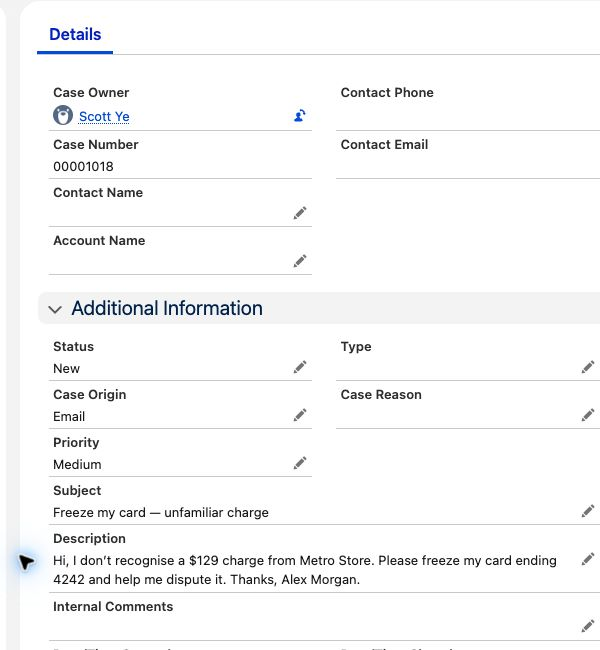
Salesforce creates and routes the Case

View 1 of 2
Demo Salesforce org; fictional customer and charge.View larger
Explainer based on Fin’s documented Salesforce setup.Source: Fin

What happensAlex’s card request is shown on a Salesforce Case. In a connected email setup, your intake and assignment rules determine which requests reach Fin.

Decisions and sources

What your team decidesWhich Cases go to Fin, and which must stay with a person.

A synthetic Case was created manually in our Salesforce demo org. Its original request is shown here; this capture does not establish Email-to-Case or a routing-rule execution. Source: How Fin integrates with Salesforce.

Fin explains the next step

View 1 of 2
Illustrated reply; adapted from a native email Preview.View larger
Demo Salesforce Case; delivery and owner change were not tested.View larger

What happensIn this email example, Fin explains that a specialist must review the card request. It does not perform a freeze.

Decisions and sources

What your team decidesWhich content, guidance and Case context Fin can use.

The illustrated reply is adapted from the response observed in native email Preview. Fin-authored activity also appeared on the manually created demo Case. Email delivery and automatic owner reassignment were not verified. Source: Fin Guidance.

Fin data connectors · Fin Procedures explained

Context for the specialist

View 1 of 3
Demo Salesforce Case; staged follow-up, not an automatic handover.
Demo Salesforce Case; staged follow-up, not an automatic handover.View larger
Explainer based on Fin’s documented Salesforce setup.Source: Fin

What happensThe specialist needs Alex’s original request, the disputed charge and the work still to do. Your settings determine who receives the Case.

Decisions and sources

What your team decidesWhen to hand over, who receives the Case, and what context they need.

The follow-up description and status were staged manually. This is a native Case example, not an automatic Fin handover or completed banking operation. Source: How Fin integrates with Salesforce.

One fictional card request, with illustrated emails and native Salesforce examples. No real banking action.

Salesforce readiness checklist

12 checks in four stages. Stages 1–2 are facts to gather with your Salesforce admin; stage 3 is specific to the Support email route; stage 4 is what you agree and test before go-live.

Stage 1 · Required features and licences

4 checks
  1. 1.1

    Confirm the org's API access

    Confirm with your Salesforce account team that your edition includes Web Services API access: Agentforce Service Core, Advanced and Max include it; Pro Suite needs the API add-on, while Starter Suite does not include it.

    Sources and details

    Salesforce edition comparison. On legacy editions, Enterprise, Unlimited and Performance include API access; Professional requires the Web Services API add-on. Developer Edition includes API access for testing. API requirements. Additional API Calls increases an allowance; it does not enable API access. API add-on guidance.

  2. 1.2

    Case management and Email-to-Case

    For support email, confirm with your Salesforce administrator that your support inbox feeds into Email-to-Case and your edition includes Case management and web/email case capture; Agentforce Service Core, Advanced and Max include those features.

    Sources and details

    Salesforce edition comparison. Email-to-Case editions lists legacy editions too. Cases setup guide. Feature inclusion alone does not establish compatibility with every Fin setup.

  3. 1.3

    A Fin plan with Salesforce integration

    Fin

    Confirm with Fin that your plan includes the Salesforce integration.

    Sources and details

    Fin plan requirement. Fin's public setup guide specifies this entitlement rather than a named plan tier.

  4. 1.4

    Salesforce Knowledge — only if you use it

    Treat Salesforce Knowledge as optional. If your team authors help articles in Salesforce, confirm with your Salesforce account team whether your edition includes it: Advanced and Max include Knowledge read/write, while Core offers it as an add-on.

    Sources and details

    Salesforce edition comparison. Fin's Salesforce sync accepts published articles that are public or visible to logged-in users; other audience targeting is excluded. Knowledge sync guide.

Stage 2 · What to have ready

3 checks
  1. 2.1

    What Fin handles and can use

    Choose the requests Fin should try first, the help content and Salesforce customer information it needs, what it must never see, and which requests must always go to a person.

    Sources and details

    Include the fields needed for answers and handover. Fin permissions reference.

  2. 2.2

    Salesforce customisations that affect Cases

    Ask your Salesforce administrator to flag mandatory Case fields and existing assignment or automation rules, because these can affect whether Fin can create, update or hand over a Case.

    Sources and details

    Integration constraints · Cases data guide.

  3. 2.3

    A place to test before go-live

    Provide a Salesforce sandbox or other test environment, plus representative, fictional customer requests, before you open the integration to customers.

    Sources and details

    Keep test and live connections distinct. Fin environment guide.

Stage 3 · Your support email (Salesforce Cases)

3 checks
  1. 3.1

    Support addresses in scope

    Choose the inboxes and Case types Fin should handle.

    Sources and details

    Support addresses need verification in both systems. Include web-form Cases only if that intake is in scope. Cases setup guide.

  2. 3.2

    The Salesforce context an answer needs

    Identify the Case information Fin needs at the start of a request, and account for the fact that Fin does not automatically refresh changed Salesforce fields mid-session.

    Sources and details

    Cases data guide. Requests needing fresher information should be scoped explicitly.

  3. 3.3

    Who takes over when a person is needed

    Choose the receiving Salesforce team or queue, and tell the customer what to expect next.

    Sources and details

    Check the resulting Case owner, handover summary and follow-up thread. Cases data guide.

Stage 4 · Before go-live

2 checks
  1. 4.1

    Agree what would make the trial a success

    Set the target the trial is judged against and when you will measure it. Then test an answer, missing information, a handover to a person and a failed request, checking what the customer sees and the Salesforce record.

  2. 4.2

    Name who decides and who signs off

    Name who judges the trial and who signs off configuration, content, security and go-live. Name who keeps help content accurate, who can pause Fin, and how your team takes over.

What can Fin access?

Reads

Case conversations and Salesforce Case, Contact and Account fields available to the integration. Salesforce Knowledge is a separate content sync.

Writes

Replies, Case context and Fin outcome fields. Handover can set the Case owner; Contact and Account updates have a separate control.

You control

Salesforce access, content sources, workflow actions and handover rules. Guidance shapes answers; it does not grant data access.

Read the data-access guide →

Questions before you start

Can we keep our support addresses and existing queues?

For Cases, start with your existing intake and decide which requests should reach Fin. Fin's email setup includes address verification. Review automatic replies and assignment rules together, then test the sender, thread and destination queue.

Should we choose Case follow-up or live handover?

Choose Case follow-up when customers can wait for a reply. Choose live handover when they need to keep chatting with your team. Decide from the service experience you need, then check the matching channel requirements.

Fin’s two handover paths

Can our agents keep working in Salesforce?

Yes. With Cases, the team works the Case. With Messenger, choose between creating a Case for follow-up and live handover to an agent in Salesforce. Confirm the applicable chat setup using the checklist above.

What happens when nobody is available to take over?

Agree the destination, customer message and expected response for out-of-hours requests. Include a test with no available agent. Do not assume the live handover experience is also your after-hours experience. See check 4.1.

Can Fin use our Salesforce Knowledge articles?

Selected published articles can sync into Fin. Check audience restrictions and publication status with your knowledge owner. Keep edits in Salesforce and check the sync before relying on a changed answer. See check 1.4.

When will Fin see changes to a Salesforce record?

For Salesforce Cases, Fin refreshes field values when it is assigned a Case. Changes made during that session are picked up on the next assignment, not while the session is running. This is separate from Knowledge article sync.

How do we protect account-specific information?

Define what a visitor can ask anonymously and what needs verified identity. Your administrator and security owner approve the identity checks, fields and actions for the selected route. Test a signed-out or unverified user as well as a recognised customer. See check 2.1.

How long will it take, and what will our team need to do?

The schedule depends on missing content, how many hours a week your Salesforce admin can give, security review and approval of changes. We agree milestones after checking those.

Can we start small and pause if something goes wrong?

Yes. Start with a few common, low-risk requests and list the ones that must always go to a person. Before go-live, agree who can pause Fin, how new requests return to your team and what happens to work already in progress. Test that fallback in your environment. See check 4.2.

Your scoping summary

A short agenda for your first implementation conversation.

Choose the starting pointBring these to the first conversation

  • The requests Fin should try first and the support addresses in scope.
  • The Salesforce rules that include or exclude Cases.
  • The queue and context your team needs at handover.

Agree the workPut these in the written scope

  • Configuration, customer inputs and the test results needed before go-live.
  • Who approves access, answers and ongoing changes.
  • Check the Cases setup guide with your administrator.
Prepare your scoping brief Optional · stays on this page

Answer what you know. “Not sure” is fine. Review and copy the brief to share with your team or with us.

Your answers stay on this page until you copy or download them. Nothing is submitted automatically.

Planning the trial with your team? The shared trial brief asks the same first questions and saves each answer with Flownetic as you go.

1. What should the trial prove?
2. Where should customers reach Fin?
3. Which kinds of requests should Fin try first?
4. What Salesforce setup do you have? Check the feature and licence requirements
5. How should requests reach your team?

Follow-up suits customers who can wait for a reply. Live handover keeps the conversation in chat.

6. Your support today
7. People and timing

Talk through your trial

The first conversation checks your route, what is still missing and the work to scope. A written proposal follows; configuration and test results come during the agreed engagement.

Request a 30-minute call Opens a Google Calendar booking page

What to have ready for the call: what the trial should prove, which requests Fin should try first, where customers should reach it, and your rough monthly support volume.

Planning a trial? Prepare a shared trial brief with your team: sign in, and answers save as you go.